
How to register
The registration process for ECMTB2026 consists of two steps:
- First, you submit a registration form in our conference management system. As a part of this form you need to select the conference fee category that applies to you. Additionally, you can register for social events like bus trips to regional sights or the conference dinner.
- Afterwards, the page will redirect you to a webshop of the university where you need to select the matching tickets for the services you have registered for in the first step.
Detailed instructions are provided below.
Pricing
Members of the Society for Mathematical Biology (SMB) or the European Society for Mathematical and Theoretical Biology (ESMTB) as well as students benefit from reduced fees. If you are not already a member, consider joining!
| Early Bird* | Regular Fee | |
|---|---|---|
| Standard Fee | 520 € | 620 € |
| Fee for SMB/ESMTB Members | 420 € | 520 € |
| Fee for Students | 420 € | 520 € |
| Fee for SMB/ESMTB Student Members | 320 € | 420 € |
| * until 30/04/2026 |
Step 1
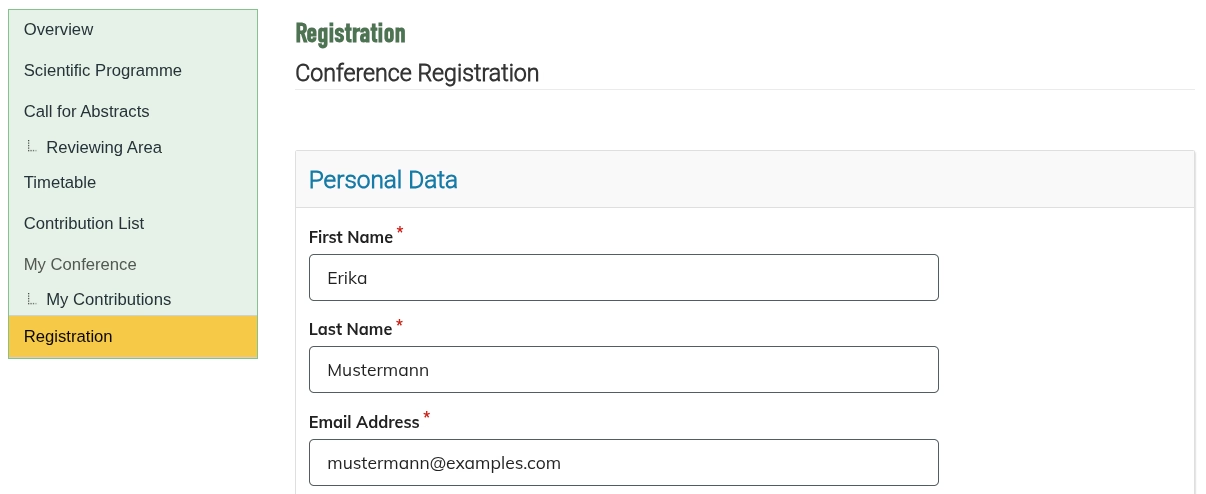
Head to the registration form to start the process.
Enter your personal information and select the fee category that applies to you.
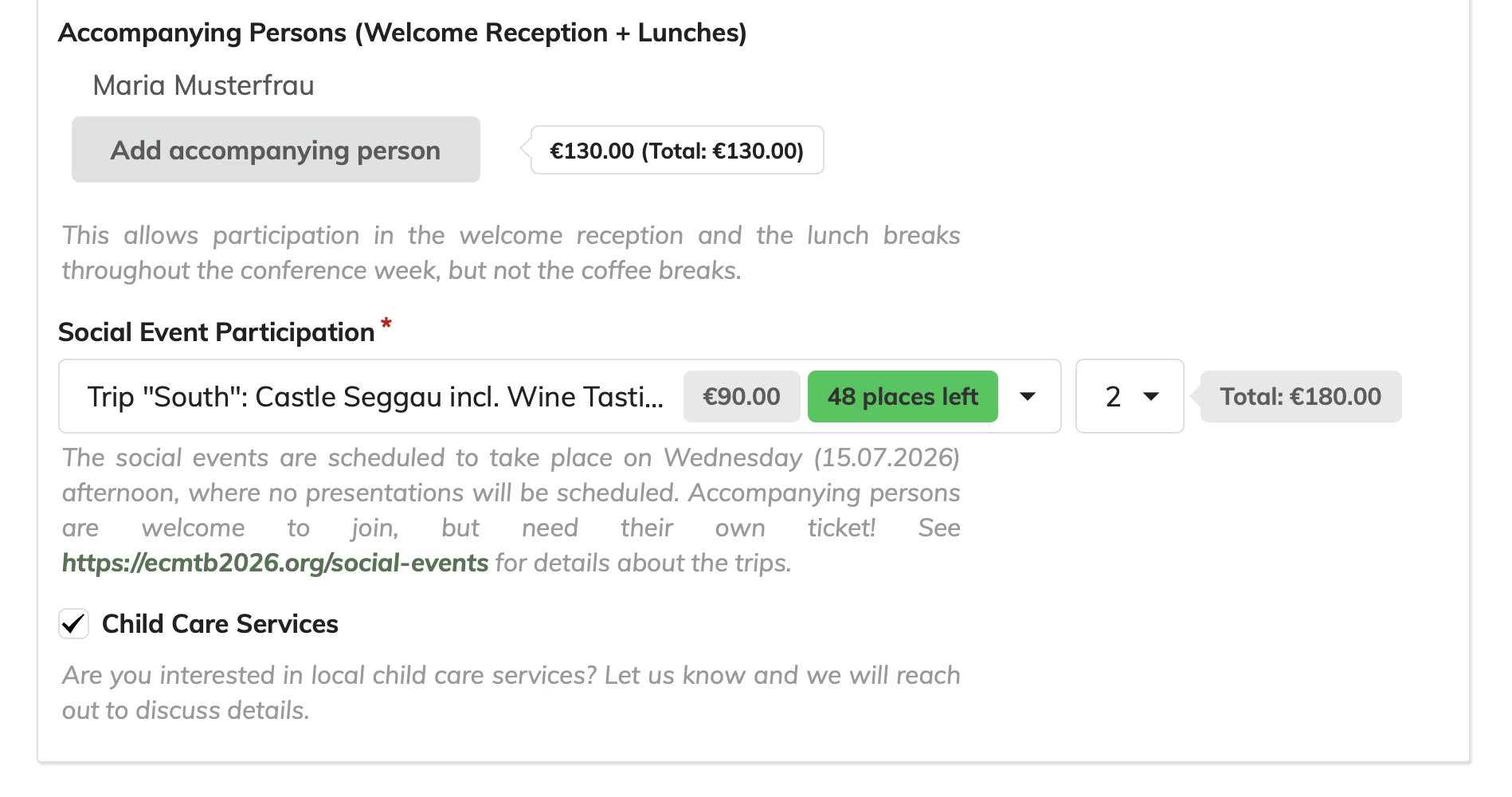
You can also choose to purchase some of our additional services (like participation in one of the social events / trips) or declare interest in local child care services.
Step 2
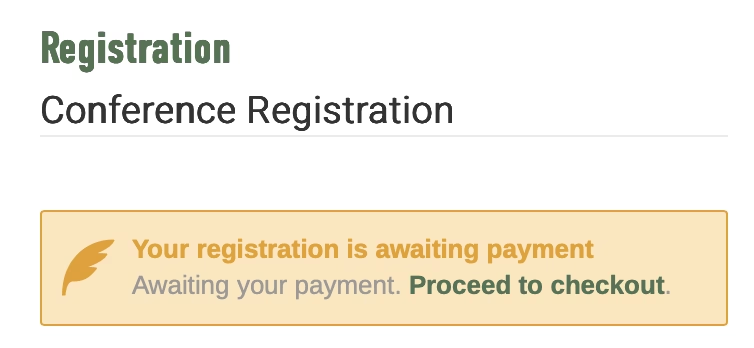
On submitting the form successfully, the system will state that your registration is awaiting payment and that you should continue to checkout. Details of your preliminary registration and reservations are also sent to you via email. Make sure that your itinerary matches your expectations!
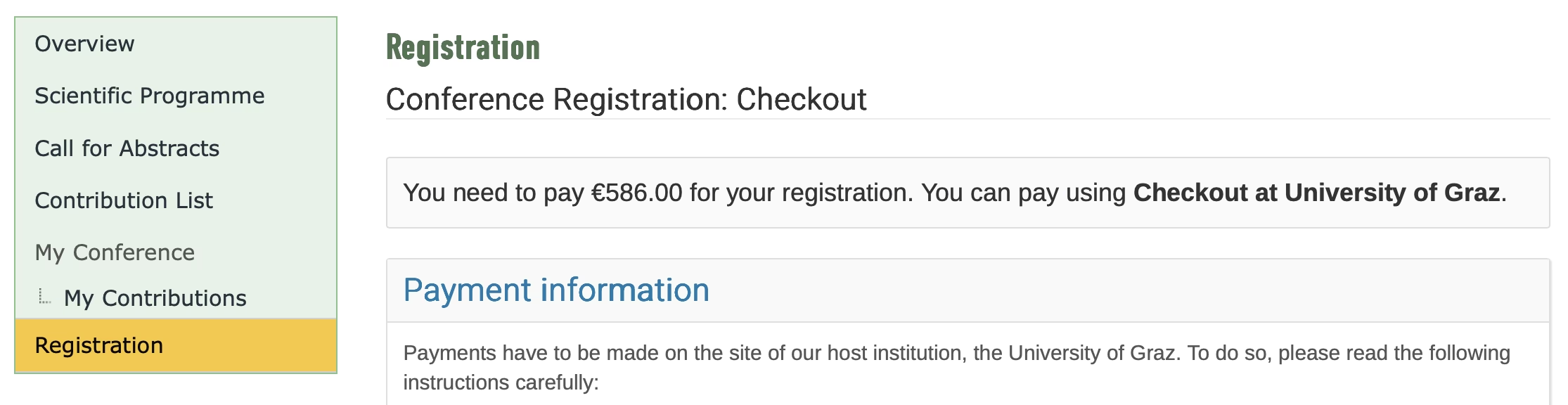
Below the registration summary displayed on the confirmation page you can continue to checkout, where you will find detailed instructions and a link to the webshop for purchasing the corresponding tickets. The webshop is hosted on the website of the Department of Mathematics at the University of Graz.
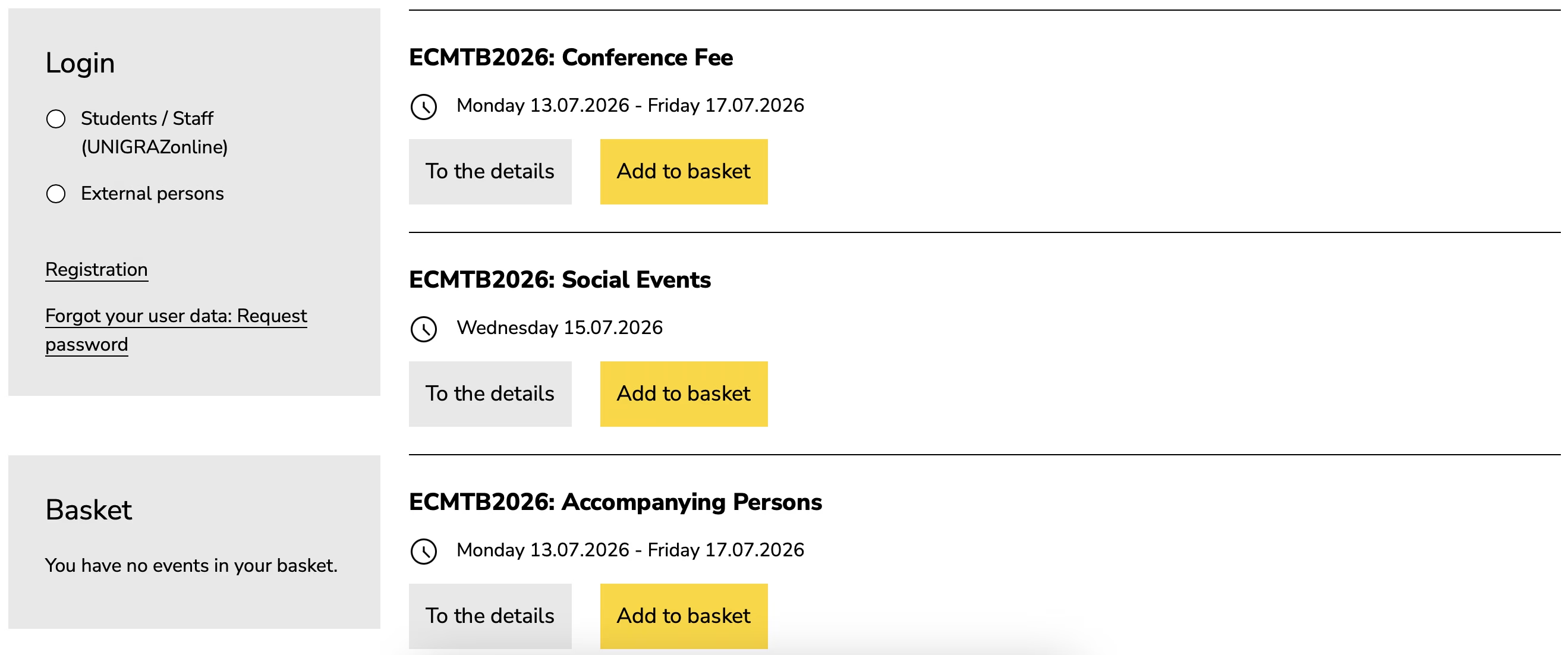
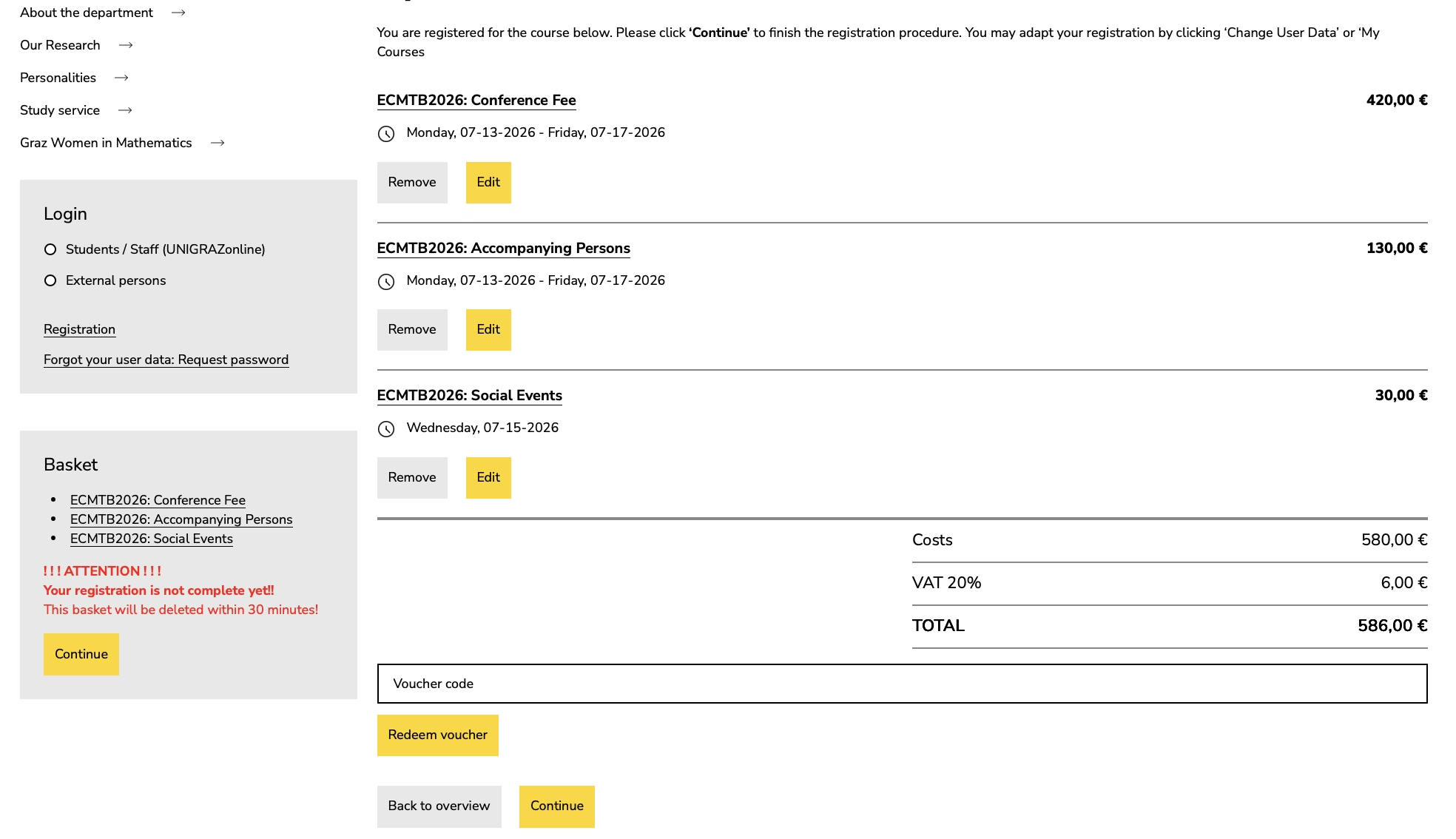
Step 3
Place the tickets for the reservations you have made on the registration site in your basket; make sure to choose the correct categories from the dropdown menus. Confirm that the total amount due matches the amount displayed on the registration page, then proceed to checkout.
Finally, while checking out in the webshop, please make sure to provide the same email address as you did in the registration form, so that we can easily match your payment to your registration.
Frequently asked questions
As long as your payment has not been registered and confirmed by us, you can update your registration details by accessing the registration form. After your payment has been confirmed, only the organizers can update your registration details. Contact us at support@ecmtb2026.org in this case.
Visit the webshop where you have purchased your tickets. After logging in (or creating a new account with the same email address you used for your purchase), you can refund your tickets from there.
For refunds requested until the end of the early bird period (30. April 2026), we will refund the full amount paid, minus a processing fee of approx. 2% to cover transaction costs.
We cannot offer refunds for cancellations requested after 30. April 2026.
Yes! Two society programs offer travel support for ECMTB 2026:
- SMB Landahl Travel Awards (deadline: 15 March 2026) – Apply via smb.org
- ESMTB Travel Support - Apply via esmtb.org
Note: These are independent programs with separate application procedures.
Yes, we aim to provide childcare services during the conference. To help us gauge demand and make the necessary arrangements, please indicate your interest in childcare when registering. For more details, visit our Childcare Services page.
You can request a formal letter of invitation signed by the organisers using this form.
Please note that we can only issue invitation letters for fully completed and paid registrations — we are unable to create a letter if your registration has not been completed yet. Once your registration is confirmed, a plain letter of participation can be issued at any point.
If you have submitted a contribution in the form of a poster, talk, or minisymposium, we can only explicitly confirm your role in the letter after the acceptance notices have been sent out.
We have received a small number of reports of failed payments with a transaction error. In all cases reported so far, the issue appears to have been caused by fraud protection measures at the card issuer.
We apologize for the inconvenience. Please contact your bank to check whether the payment is being blocked. If you suspect the problem may be on our side, please email support@ecmtb2026.org.
No further action is needed on your side.
We manually match ticket purchases to Indico registrations, so please allow 1–2 business days for your registration status to be updated.
Please also note that we can only mark a registration as completed if the amount paid matches the registration details. If you accidentally purchased the wrong ticket, we will contact you to arrange a refund.
The conference fee includes participation in the conference reception on Monday evening, as well as all coffee breaks and lunches during the conference.
The following are not included in the conference fee:
- participation in one of the social trips on Wednesday afternoon (this must be booked separately)
- accommodation
If you book your accommodation via our local tourism partner, we will likely be able to provide you with a public transport ticket for the conference week.
Unfortunately, no. Due to the scale of the conference and the corresponding restrictions imposed by our accounting department, additional means of payment besides the credit card payment in the webshop are not possible.
An invoice is generated automatically after payment in the webshop. During checkout, you can also enter dedicated billing information for the invoice. Please note that we are unable to change the invoice details once the invoice has been generated.
An invoice is generated and sent to you automatically after you complete the credit card payment in our webshop. Detailed instructions for accessing the webshop are sent to you once you have submitted the conference registration form via our registration form.
As part of the checkout process in the webshop, you can enter a dedicated billing address and billing information, for example in the name of your employer. Please be aware that we are unable to change the information on the invoice once it has been generated. If you need help with the process, please contact us at contact@ecmtb2026.org.
Yes: by default, the invitation to speak in one of our minisymposia does not come with a fee waiver.
%20by%20Marsupilami%20--%3e%3csvg%20xmlns:svg='http://www.w3.org/2000/svg'%20xmlns='http://www.w3.org/2000/svg'%20version='1.1'%20width='892'%20height='768'%20viewBox='-1.66203747%20-1.66203747%2068.18782194%2058.72532394'%20id='svg9193'%3e%3cdefs%20id='defs9195'%20/%3e%3cpath%20d='m%200,55.40125%2064.86375,0%20L%2064.86375,0%200,0%200,55.40125%20z'%20id='path3442'%20style='fill:%23d9dbdc;fill-opacity:1;fill-rule:nonzero;stroke:none'%20/%3e%3cpath%20d='m%202.85501,2.8575%2018.9275,0%200,49.67875%20-18.9275,0%200,-49.67875%20z'%20id='path3444'%20style='fill:%23ffffff;fill-opacity:1;fill-rule:nonzero;stroke:none'%20/%3e%3cpath%20d='m%2021.78251,2.8575%2040.21999,0%200,49.67875%20-40.21999,0%200,-49.67875%20z'%20id='path3446'%20style='fill:%23ffd500;fill-opacity:1;fill-rule:nonzero;stroke:none'%20/%3e%3cpath%20d='m%2045.67713,45.13812%20-1.01375,0%200,1.39875%201.01375,0%20c%200.63,0%200.81875,-0.30875%200.81875,-0.705%200,-0.3825%20-0.18875,-0.69375%20-0.81875,-0.69375%20m%205.26,2.27375%201.30625,0%20-0.64125,-1.54%20-0.665,1.54%20z%20m%20-29.155,5.1325%2040.22625,0%200,-9.61%20-40.22625,0%200,9.61%20z%20m%2019.82875,-4.2175%20c%20-0.465,0.9%20-1.54125,1.4275%20-2.6775,1.4275%20-1.85375,0%20-3.12,-1.36875%20-3.12,-3.055%200,-1.6875%201.42625,-3.055%203.12,-3.055%201.01625,0%201.91625,0.49125%202.47375,1.25%20l%20-1.19875,0.84875%20c%20-0.3175,-0.42875%20-0.7,-0.6725%20-1.275,-0.6725%20-0.965,0%20-1.61,0.6675%20-1.61,1.62875%200,0.95875%200.66625,1.58875%201.63125,1.58875%200.8375,0%201.3,-0.3425%201.41375,-0.7725%20l%20-1.00125,0%200,-1.075%202.50375,0%2010e-4,0.4875%20c%200,0.51125%20-0.0537,1.00375%20-0.26125,1.39875%20m%2011.56125,1.31625%20-0.48875,-1.02375%20-2.17625,0%20-0.48875,1.02375%20-3.32625,0%20-1.13875,-1.7175%20-0.89,0%200,1.7175%20-1.64375,0%200,-5.89375%202.8125,0%20c%201.31875,0%202.18625,0.91%202.18625,2.0825%200,0.79875%20-0.34625,1.37875%20-1.0325,1.665%20l%201.3975,1.98%203.06,-5.7825%200.385,0%203.05875,5.94875%20-1.715,0%20z%20m%206.99125,0%20-4.9175,0%200,-0.4575%202.56375,-4.0475%20-2.525,0%200,-1.38875%204.87875,0%200,0.3375%20-2.67375,4.1675%202.67375,0%200,1.38875%20z%20m%20-2.93708,-17.83562%202.89126,0%200,10.16375%20-2.89126,0%200,-10.16375%20z%20m%20-10.53987,-0.1905%200.815,0%205.285,4.78125%200,-4.5925%202.88,0%200,10.3%20-0.88375,0%20-5.2075,-4.7225%200,4.58875%20-2.895,-0.001%200.0125,-10.35375%20z%20m%20-10.97975,0.19175%200,5.85125%20c%200,2.5625%202.22,4.51%204.7825,4.50875%202.56,-0.004%204.77375,-1.95%204.77375,-4.51125%20l%200,-5.85%20-2.91125,0%200,5.41875%20c%200,1.28375%20-0.765,2.13875%20-1.87375,2.14%20-1.11125,0%20-1.88,-0.80125%20-1.88,-2.14%20l%200,-5.41875%20-2.89125,10e-4%20z'%20id='path3472'%20style='fill:%23000000;fill-opacity:1;fill-rule:nonzero;stroke:none'%20/%3e%3c/svg%3e%3c!--%20version:%2020110311,%20original%20size:%2064.863747%2055.401249,%20border:%203%25%20--%3e)







'%20d='M473.09%20122.97c0%2022.69-10.19%2042.85-25.72%2055.08L296.61%20312.69c-2.8%202.4-6.44-1.47-4.42-4.7l55.3-110.72c1.55-3.1-.46-6.91-3.64-6.91H129.36c-33.22%200-60.4-30.32-60.4-67.37%200-37.06%2027.18-67.37%2060.4-67.37h283.33c33.22-.02%2060.4%2030.3%2060.4%2067.35zM129.36%20506.05h283.33c33.22%200%2060.4-30.32%2060.4-67.37%200-37.06-27.18-67.37-60.4-67.37H198.2c-3.18%200-5.19-3.81-3.64-6.91l55.3-110.72c2.02-3.23-1.62-7.1-4.42-4.7L94.68%20383.6c-15.53%2012.22-25.72%2032.39-25.72%2055.08%200%2037.05%2027.18%2067.37%2060.4%2067.37z'/%3e%3cpath%20fill='url(%23b)'%20d='M651.86%20381.9l124.78-179.6v-1.56H663.52v-48.98h190.09v34.21L731.55%20363.24v1.56h124.01v48.98h-203.7V381.9zm338.98-230.14V302.6c0%2045.09%2017.1%2068.03%2047.43%2068.03%2031.1%200%2048.2-21.77%2048.2-68.03V151.76h59.09V298.7c0%2080.86-40.82%20119.34-109.24%20119.34-66.09%200-104.96-36.54-104.96-120.12V151.76h59.48zm244.91%200h59.48v212.25h104.18v49.76h-163.66V151.76zm297%200v262.01h-59.48V151.76h59.48zm90.18%203.5c18.27-3.11%2043.93-5.44%2080.08-5.44%2036.54%200%2062.59%207%2080.08%2020.99%2016.72%2013.22%2027.99%2034.99%2027.99%2060.64%200%2025.66-8.55%2047.43-24.1%2062.2-20.21%2019.05-50.15%2027.6-85.13%2027.6-7.77%200-14.77-.39-20.21-1.17v93.69h-58.7V155.26zm58.7%20118.96c5.05%201.17%2011.27%201.55%2019.83%201.55%2031.49%200%2050.92-15.94%2050.92-42.76%200-24.1-16.72-38.49-46.26-38.49-12.05%200-20.21%201.17-24.49%202.33v77.37z'/%3e%3c/svg%3e)

